Most Kubernetes cost advice stops at "right-size your workloads." That's one lever out of eight, and on its own it frequently produces no change to the invoice at all.
This is a practitioner's playbook: the specific changes that reduce a Kubernetes bill, roughly in order of return, with the commands and configuration to make each one. It assumes you already know that you're overspending and want to know what to actually do about it.
If you're still choosing tooling, that's a different question — we compare twelve options in the Kubernetes cost optimization tools guide. This piece is about the work itself.
First: Find Your Biggest Lever
Don't start with whatever's easiest to change. Fifteen minutes of looking tells you which of the strategies below is worth your week.
# How much of what you provision is actually requested?
kubectl describe nodes | grep -A 5 "Allocated resources"

# How much of what's requested is actually used?
kubectl top pods --all-namespaces --sum

# What are you paying per hour for — on-demand or spot?
kubectl get nodes -L eks.amazonaws.com/capacityType,karpenter.sh/capacity-type,node.kubernetes.io/instance-type- Requests far above usage, nodes reasonably full → Strategy 1. Your pods are the problem.
- Requests reasonable, nodes half-empty → Strategy 2. Your packing is the problem.
- Everything on-demand → Strategies 3 and 4. Your purchasing is the problem, and it's the fastest to fix.
- Bill much larger than compute explains → Strategies 6, 7 and 8. Look at networking, storage and forgotten resources.
Strategy 1: Right-Size Requests From Real Usage
Usually the largest single bucket, and contained to a manifest, so it carries the least political friction.
See exactly where your cluster is wasting money.
Connect read-only in 10 minutes. Free, no credit card, nothing changes in your cluster.
The distinction that causes the waste: requests are what the scheduler reserves — they decide node placement and hold capacity, so requests are what you pay for. Limits are the ceiling that triggers OOMKill or throttling. Teams pad requests when what they actually feared was hitting a limit.
Size from p95 over at least a week, not from the highest value ever recorded:
# p95 CPU per workload over 30 days
quantile_over_time(0.95,
  sum by (namespace, pod) (
    rate(container_cpu_usage_seconds_total{container!="POD",container!=""}[5m])
  )[30d:5m]
)

# p95 memory — working set, NOT usage_bytes
quantile_over_time(0.95,
  sum by (namespace, pod) (
    container_memory_working_set_bytes{container!="POD",container!=""}
  )[30d:5m]
)
The mistake that causes incidents: size memory against container_memory_working_set_bytes, not container_memory_usage_bytes. The latter includes reclaimable page cache, reads meaningfully higher, and leaves you over-provisioned — and working set is what the kernel evaluates when it decides to OOMKill.
Get recommendations without touching a pod by running VPA in recommend-only mode:
apiVersion: autoscaling.k8s.io/v1
kind: VerticalPodAutoscaler
metadata:
  name: checkout-vpa
spec:
  targetRef:
    apiVersion: apps/v1
    kind: Deployment
    name: checkout
  updatePolicy:
    updateMode: "Off"      # recommend only — never evicts

# kubectl describe vpa checkout-vpa
#   Target:       cpu: 240m   memory: 512Mi
#   Upper Bound:  cpu: 890m   memory: 1200Mi
A wide gap between Target and Upper Bound means a bursty workload — apply the Target naively there and you'll cause OOM kills. Note also that VPA and HPA conflict on the same resource: run VPA on memory and HPA on CPU, or HPA on a custom metric.
Strategy 2: Consolidate Onto Fewer Nodes
This is the step that converts Strategy 1 into money. Right-sized pods on unchanged nodes produce headroom, not savings — you've freed capacity you're still paying for. Something has to repack workloads and terminate the empties.
apiVersion: karpenter.sh/v1
kind: NodePool
metadata:
  name: default
spec:
  disruption:
    consolidationPolicy: WhenEmptyOrUnderutilized   # the cost-relevant setting
    consolidateAfter: 30s
    budgets:
      - nodes: "10%"                                # limit churn
Before enabling aggressive consolidation, make sure workloads carry PodDisruptionBudgets — otherwise you'll trade cost for availability incidents.
Two more node-level wins: match instance family to workload shape (memory-heavy services on compute-optimized instances waste the CPU you're buying), and test ARM instances where your images support multi-arch builds.
Strategy 3: Move Interruptible Work to Spot
The fastest lever, because it changes what you're billed rather than what you run. Spot pricing is dynamic per instance type and zone, so check current rates before modelling.
What makes it safe rather than reckless:
- Diversify across instance types and zones. A pool spanning several families is far less likely to be reclaimed all at once.
- Handle the two-minute notice — graceful shutdown, PodDisruptionBudgets, workloads that tolerate rescheduling.
- Keep an on-demand floor for stateful services and anything with a hard availability target.
- Gate it with taints and tolerations so only spot-tolerant workloads land there.
# Only workloads that explicitly tolerate spot schedule onto it
tolerations:
  - key: "karpenter.sh/capacity-type"
    operator: "Equal"
    value: "spot"
    effect: "NoSchedule"
Strategy 4: Commit to Your Floor, Not Your Average
Savings Plans and Reserved Instances trade a commitment for a lower rate. Compute Savings Plans apply flexibly across instance families and sizes, which suits Kubernetes because your node mix shifts as workloads change.
Calculate the baseline node count you're confident about and commit only to that. Let autoscaling and spot handle everything above it. Over-committing to an average locks you into capacity you'll spend the next year working around.
Three things commitments never cover: data transfer, NAT Gateway charges and EBS. Those stay at list price no matter how much you commit — which is why Strategies 6 and 7 matter more than most teams assume.
Strategy 5: Delete What Nobody Owns
The fastest savings in any cluster, because there's no performance trade-off to argue about.
# PersistentVolumes outliving the claims that made them
kubectl get pv -o custom-columns='NAME:.metadata.name,CAP:.spec.capacity.storage,STATUS:.status.phase,POLICY:.spec.persistentVolumeReclaimPolicy' \
  | grep -E 'Released|Available'

# Every LoadBalancer Service is a separate billable AWS resource
kubectl get svc -A --field-selector spec.type=LoadBalancer

# Namespaces with no running pods — usually abandoned environments
kubectl get ns -o name | while read ns; do
  n=$(kubectl get pods -n "${ns#namespace/}" --no-headers 2>/dev/null | wc -l)
  [ "$n" -eq 0 ] && echo "empty: $ns"
done
A PV with persistentVolumeReclaimPolicy: Retain survives the PVC that created it, and nobody ever goes back for it. The same applies to unattached Elastic IPs, old snapshots without a lifecycle policy, and staging environments from a project that shipped last year.
Strategy 6: Scale Non-Production to Zero
Dev, staging and QA clusters typically run 24/7 to serve a team that works 40 hours a week. That's roughly 75% of their runtime spent idle.
Scale node groups to zero outside working hours with a scheduled job, and let the cluster autoscaler bring them back on demand. Combine it with ephemeral per-PR environments that tear down on merge, and non-prod stops being a permanent line item.
The objection is always "someone might need it at 9pm" — worth testing rather than assuming. Most teams find the answer is nobody, and a 10-minute cold start is an acceptable trade.
Strategy 7: Stop Paying for Traffic You Don't Need
Networking routinely adds 20–40% on top of compute, and none of it appears under a Kubernetes line item.
- Gateway VPC endpoints for S3 and DynamoDB are free. They route that traffic off your NAT Gateway entirely, removing per-GB processing charges. This is the highest-return networking change available and it takes minutes.
- Interface endpoints for ECR and CloudWatch Logs cost less per GB than NAT once volume is meaningful — image pulls and log shipping are usually the two biggest NAT consumers in a cluster.
- Cross-AZ traffic is charged in both directions. Kubernetes doesn't consider zones when scheduling by default, so chatty service pairs generate real volume silently. Topology-aware routing keeps traffic zone-local where the workload allows.
- Consolidate load balancers. Every
Serviceof typeLoadBalancerprovisions a billable resource; routing through a shared Ingress controller collapses many into one. - Set log retention. Default drivers ship all container stdout to a managed log service, and retention usually defaults to never expiring.
Strategy 8: Right-Size Storage, Not Just Compute
- Migrate gp2 to gp3. Cheaper per GB at equivalent baseline performance. If you're still on gp2, this is free money.
- Match the storage class to the access pattern. Plenty of workloads default to SSD-backed storage for data that's written once and read monthly.
- Put logs, backups and static assets in object storage rather than block volumes.
- Add lifecycle policies to snapshots. Automated snapshots without expiry are a slow, invisible leak.
Strategy 9: Make the Changes Survive
This is where most cost programmes quietly fail, and it has nothing to do with finding waste.
In a cluster managed by ArgoCD or Flux, a change applied directly to a live workload is drift. Someone runs kubectl patch, pods restart with the new limits, everyone moves on — and the next sync restores the manifest value. The saving disappears silently, and weeks later nobody can explain why the bill didn't move.
# If either returns resources, applied changes will revert
kubectl get applications.argoproj.io -A 2>/dev/null | head
kubectl get kustomizations.kustomize.toolkit.fluxcd.io -A 2>/dev/null | head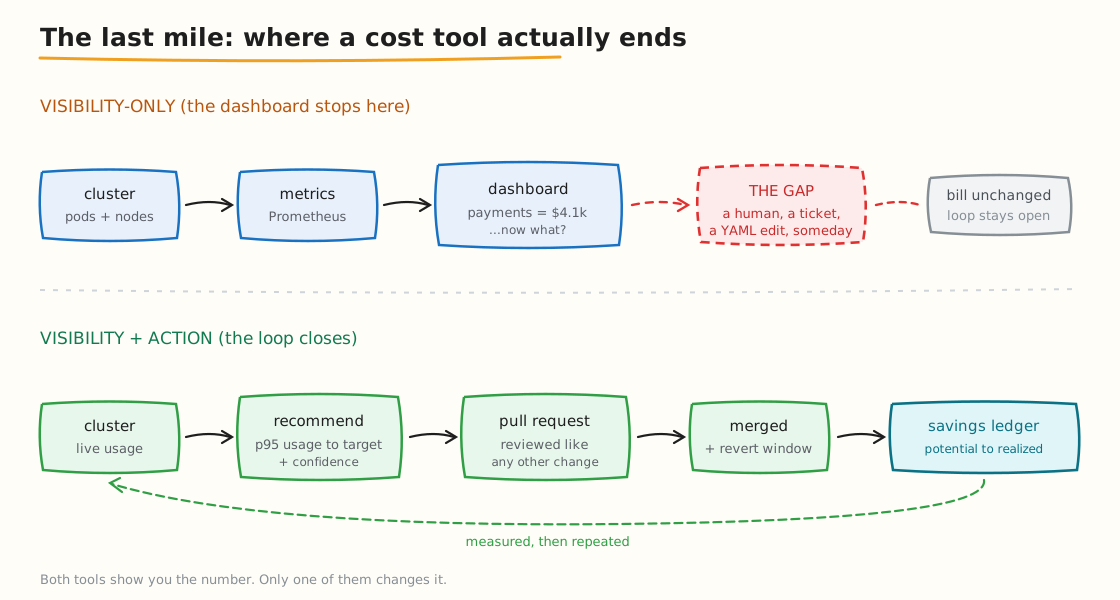
Between the recommendation and the bill sits a human, a ticket and a YAML edit — which is where most savings die.
The durable version is a merged pull request against the manifest. Beyond that, three habits decide whether savings hold:
- Name an owner and a cadence. Recommendations accumulate; without someone reviewing them weekly the backlog grows until it's easier to ignore.
- Track realized, not potential. Potential savings are a forecast. What counts is what merged and what showed up on the invoice.
- Re-baseline quarterly. New services ship with conservative defaults and drift back. Right-sizing that runs once at deployment isn't right-sizing.
A Realistic Sequence
If you're starting from nothing, this order front-loads the return:
- Week 1 — delete orphaned volumes, load balancers and abandoned namespaces (Strategy 5). No trade-offs, immediate effect.
- Week 1 — add Gateway VPC endpoints for S3 and DynamoDB (Strategy 7). Free, minutes of work.
- Week 2 — scale non-production to zero out of hours (Strategy 6).
- Weeks 2–3 — enable spot for interruptible workloads with proper diversification (Strategy 3).
- Weeks 3–4 — right-size requests from p95, one namespace at a time (Strategy 1).
- Week 4 — turn on consolidation so freed capacity becomes fewer nodes (Strategy 2).
- Month 2 — commit to the floor once the new baseline is stable (Strategy 4).
Commitments come last deliberately. Commit before optimizing and you'll lock in capacity you were about to stop needing.
Where Atmosly Helps
Atmosly automates the parts of this playbook that don't survive being done by hand.
Right-sizing recommendations come from p95 usage with a confidence level and estimated saving attached, and are applied as a GitOps pull request — which is what Strategy 9 is about. Node-level analysis shows bin-packing per nodegroup and flags spot-eligible groups with the live price delta, so Strategies 2 and 3 stop being a spreadsheet exercise. Idle capacity is surfaced separately rather than smeared across teams, and a savings ledger tracks each change from potential to realized.
Node and spot changes are surfaced for a human to action rather than applied automatically. Connection is read-only, and there's a free tier covering one cluster and one environment.
Key Takeaways
- Find your biggest lever before you start. The easiest change is rarely the most valuable one.
- Right-sizing without consolidation produces headroom, not savings. Strategy 1 only pays once Strategy 2 follows.
- Use working-set memory, not usage_bytes. The wrong metric will leave you over-provisioned.
- Delete before you optimize. Orphaned volumes and load balancers have no performance trade-off to debate.
- Commit last. Locking in capacity before optimizing locks in the waste.
- Networking and storage add 20–40% and no commitment discount touches them.
- In a GitOps cluster, a change that doesn't survive the next sync was never a saving.
Put a Number on Your Own Cluster
Every strategy above is worth a different amount depending on where your waste actually sits.
- Connect a cluster read-only for a free audit — see which of these levers is worth your week, with the saving attached to each. Nothing changes in your cluster, no sales call.
- Or start on the free tier — one cluster, one environment, no credit card.
- Related: choosing a cost tool · what EKS actually charges for · attributing cost to teams