Most Kubernetes cost advice is cloud-agnostic, which means it stops exactly where EKS gets interesting. Right-sizing pods and packing nodes matters everywhere. What actually moves an EKS bill are the AWS-specific decisions underneath: which compute model you run, which autoscaler provisions your nodes, whether your control planes have quietly rolled onto extended support, and how much you're paying to move bytes between availability zones.
This guide covers the levers that only exist on EKS, roughly in order of payback. It assumes you already know what EKS charges for — if you don't, start with Amazon EKS pricing explained, which walks every line item with worked monthly totals. This piece is about reducing that bill, not itemising it.
The AWS-Native Levers, Ranked
| Lever | What it changes | Effort | Typical impact |
|---|---|---|---|
| 1. Get off extended support | Control plane rate, per cluster | Medium — it's an upgrade | $365/mo per cluster |
| 2. Right compute model | Auto Mode vs node groups vs Fargate | Medium | 10–30% of compute |
| 3. Karpenter over Cluster Autoscaler | Node selection and consolidation | Medium | Large — often the biggest single win |
| 4. Spot with proper handling | Instance purchase price | Medium | Very large on tolerant workloads |
| 5. Graviton | Price per vCPU | Low if images are multi-arch | Meaningful, low risk |
| 6. VPC endpoints | NAT data processing | Low — minutes | Free to do, immediate |
| 7. gp2 → gp3 | EBS rate per GB | Low | ~20% of EBS spend |
| 8. Consolidate control planes | $73/mo per cluster removed | High | Only at cluster sprawl |
Lever 6 is the anomaly: it costs nothing, takes minutes, and most clusters have never done it. Start there while you plan the rest.
1. Check Whether You're on Extended Support
This is the most expensive thing on this page and the least discussed, because it isn't a decision anyone makes — it's a decision made for you by the calendar.
EKS charges $0.10 per cluster-hour while your Kubernetes version is in standard support, which covers roughly the first 14 months after that version becomes available. When it lapses, the cluster moves automatically to extended support at $0.60 per cluster-hour. Same cluster, same nodes, six times the control plane rate — $73/month becomes $438.
No approval step, no confirmation email. And it's per cluster, so a dev/staging/prod trio goes from $219/month to $1,314.
# Which of your clusters are on extended support right now?
for c in $(aws eks list-clusters --query 'clusters[]' --output text); do
  printf "%-28s %s\n" "$c" \
    "$(aws eks describe-cluster --name "$c" \
       --query 'cluster.[version,upgradePolicy.supportType]' --output text)"
done
Anything returning EXTENDED is costing you $365/month more than it needs to. The irony is that the clusters most likely to drift are the ones under the strictest change control — Terraform pins a version, nobody schedules the upgrade, and the meter changes on its own.
The fix is operational, not financial: track version lifecycles and upgrade inside the 14-month window. Our EKS upgrade guide covers doing that without downtime.
See which of these levers your cluster actually needs.
Free, read-only. Bin-packing, spot-eligible nodegroups and idle capacity in 10 minutes.
2. Choose the Right Compute Model
EKS gives you three ways to run pods, and the gap between them is larger than most teams assume. This is a cost decision dressed up as an architecture decision.
| Managed node groups | EKS Auto Mode | Fargate | |
|---|---|---|---|
| You pay for | EC2 instances | EC2 + management surcharge | vCPU-hours + GB-hours |
| Billing granularity | Whole instance | Whole instance | Per pod |
| Idle capacity | You pay for it | You pay for it | None |
| Spot eligible | Yes | Yes | No |
| Savings Plans apply | Yes | EC2 portion only | Yes (Compute SP) |
| Ops effort | Highest | Low | Lowest |
| Best when | Steady, well-packed, spot-heavy | Small team, no platform engineer | Spiky or intermittent |
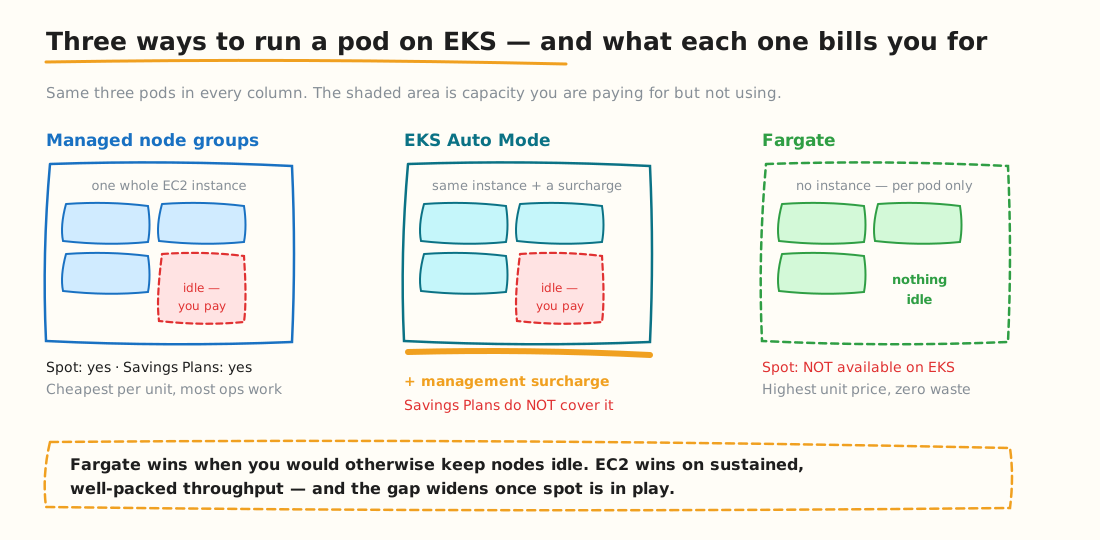
Same three pods in each column. The shaded area is capacity you are billed for and not using.
The Auto Mode detail that catches people out: the management surcharge is not discounted by Savings Plans or Reserved Instances — those apply only to the EC2 portion underneath it. If you have heavy commitment coverage, the effective premium against what you actually pay is higher than the headline percentage. Model it against your committed rates, not list price.
The Fargate rule of thumb: it wins when you'd otherwise keep nodes idle. A batch job that runs twice a day, a preview environment that lives for an hour, a service with genuinely spiky traffic — Fargate bills only while pods run. For sustained throughput on well-packed nodes, EC2 is cheaper, and the gap widens once spot is in play.
Plenty of clusters should run both: Fargate for bursty work, node groups for the baseline. For what Auto Mode actually does beyond cost, see our guide to Amazon EKS Auto Mode.
3. Replace Cluster Autoscaler with Karpenter
If you're still on Cluster Autoscaler, this is usually the single biggest available win on an EKS cluster.
The difference is structural. Cluster Autoscaler scales node groups you defined in advance — it can only add more of what you already told it about. Karpenter looks at pending pods and provisions the instance that actually fits them, choosing from the whole EC2 catalogue.
| Cost behaviour | Managed node groups (fixed) | Cluster Autoscaler | Karpenter |
|---|---|---|---|
| Instance selection | You pick, up front | Limited to defined groups | Chooses per workload |
| Bin-packing quality | Whatever you guessed | Constrained by group shapes | Optimised at provision time |
| Scale-down | Manual | Only fully empty nodes | Actively consolidates |
| Spot handling | Manual setup | Separate groups needed | Native, with fallback |
| Mixed instance types | One per group | One per group | Any, in one pool |
| ARM alongside x86 | Separate group | Separate group | Same pool |
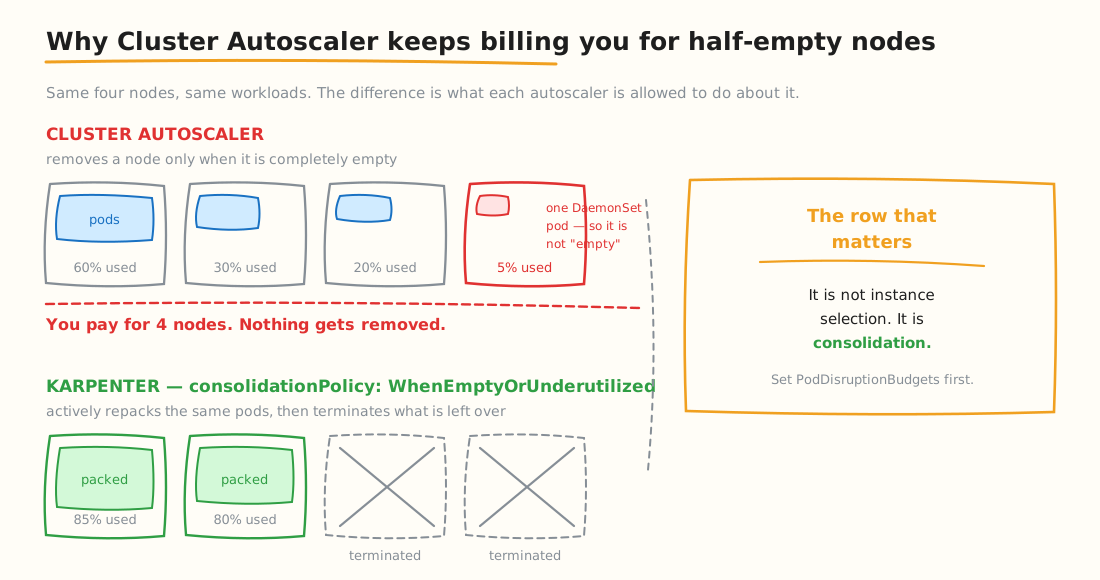
A single DaemonSet pod is enough to keep a 5%-utilised node alive under Cluster Autoscaler — and billing.
Consolidation is the row that matters. Cluster Autoscaler removes a node only once it's completely empty, which in practice rarely happens — a single DaemonSet pod keeps it alive and billing. Karpenter actively repacks workloads onto fewer nodes and terminates what's left over.
apiVersion: karpenter.sh/v1
kind: NodePool
metadata:
  name: default
spec:
  template:
    spec:
      requirements:
        - key: karpenter.sh/capacity-type
          operator: In
          values: ["spot", "on-demand"]      # opens the spot lever
        - key: kubernetes.io/arch
          operator: In
          values: ["amd64", "arm64"]          # opens the Graviton lever
        - key: karpenter.k8s.aws/instance-category
          operator: In
          values: ["c", "m", "r"]
  disruption:
    consolidationPolicy: WhenEmptyOrUnderutilized   # the cost-relevant line
    consolidateAfter: 30s
    budgets:
      - nodes: "10%"                                # caps churn
Three settings in that block do most of the work — allowing spot, allowing arm64, and enabling consolidation. The budgets stanza limits how much disruption happens at once.
Before you enable aggressive consolidation, make sure workloads carry PodDisruptionBudgets. Otherwise you'll trade cost for availability incidents, which is not a trade anyone thanks you for. For the mechanics rather than the economics, see our Karpenter autoscaling guide.
4. Run Spot Properly
Spot is the largest discount AWS offers and the one teams most often adopt badly, then abandon after an incident. The EKS-specific pieces are what make it safe.
- Diversify across instance families and zones. A pool spanning c6i, m6i, r6i and their Graviton equivalents across three AZs is far less likely to be reclaimed at once than a pool of one type.
- Use
capacity-optimizedallocation rather than lowest-price. It picks from the deepest capacity pools, which materially reduces interruption frequency for a marginal price difference. - Enable Capacity Rebalancing. AWS signals when an instance is at elevated risk before the two-minute notice, giving you time to drain gracefully rather than react.
- Handle the interruption. Karpenter does this natively; on managed node groups you want AWS Node Termination Handler.
- Keep an on-demand floor for stateful workloads, controllers, and anything with a hard availability target.
# Only workloads that explicitly tolerate spot land there
tolerations:
  - key: "karpenter.sh/capacity-type"
    operator: "Equal"
    value: "spot"
    effect: "NoSchedule"

# And keep replicas spread so one reclamation cannot take the service out
topologySpreadConstraints:
  - maxSkew: 1
    topologyKey: topology.kubernetes.io/zone
    whenUnsatisfiable: ScheduleAnyway
    labelSelector:
      matchLabels:
        app: checkout
5. Move to Graviton Where You Can
AWS Graviton instances offer better price-per-vCPU than their x86 equivalents, and on EKS the switch is usually less work than teams expect — because Karpenter can run both architectures from a single NodePool.
The blocker is almost never Kubernetes. It's whether your container images are built for arm64. Most mainstream base images and official charts already publish multi-arch manifests; the friction sits with your own images and any vendored binaries.
# Does this image already support arm64?
docker manifest inspect <your-image>:<tag> \
  | jq -r '.manifests[].platform | "\(.os)/\(.architecture)"'

# Build multi-arch going forward
docker buildx build --platform linux/amd64,linux/arm64 -t <image>:<tag> --push .
Start with stateless services that use standard base images. Leave anything with compiled native dependencies until last.
6. Stop Paying to Move Your Own Bytes
This is the cheapest item on the page and the most neglected. None of it appears under "EKS" on your bill — it's VPC and EC2 line items — which is exactly why nobody owns it.
- Gateway VPC endpoints for S3 and DynamoDB are free. They route that traffic off your NAT Gateway entirely, removing per-GB processing charges. There is no downside and no reason not to have done this already.
- Interface endpoints for ECR and CloudWatch Logs beat NAT above roughly 626 GB/month to that service. On a cluster that scales nodes frequently, image pulls alone usually clear that.
- Cross-AZ traffic is charged in both directions. Kubernetes doesn't consider zones when scheduling by default, so chatty service pairs generate volume silently. Topology-aware routing keeps traffic zone-local where the workload tolerates it.
- Collapse LoadBalancer Services. Every
Serviceof typeLoadBalancerprovisions a billable AWS resource. Routing through a shared Ingress controller turns many into one.
# How many billable load balancers is this cluster running?
kubectl get svc -A --field-selector spec.type=LoadBalancer --no-headers | wc -l

# Keep Service traffic in-zone where the workload allows it
kubectl annotate service checkout \
  service.kubernetes.io/topology-mode=Auto
7. Fix Storage Defaults
Small numbers that persist forever, which makes them worth an afternoon.
- Migrate gp2 to gp3. Cheaper per GB at equivalent baseline performance, with IOPS and throughput provisioned independently. If your
StorageClassstill defaults to gp2, every new volume compounds the problem. - Reclaim orphaned volumes. A PersistentVolume with
persistentVolumeReclaimPolicy: Retainoutlives the claim that created it. Nobody goes back for these. - Add lifecycle policies to snapshots. Automated snapshots without expiry are an invisible, compounding leak.
# Volumes still billing after their claim is gone
kubectl get pv -o custom-columns='NAME:.metadata.name,CAP:.spec.capacity.storage,STATUS:.status.phase,POLICY:.spec.persistentVolumeReclaimPolicy' \
  | grep -E 'Released|Available'

# Is your default StorageClass still gp2?
kubectl get storageclass -o custom-columns='NAME:.metadata.name,TYPE:.parameters.type,DEFAULT:.metadata.annotations.storageclass\.kubernetes\.io/is-default-class'
8. Consolidate Control Planes
Every EKS cluster costs $73/month before a single pod runs. That's noise on one production cluster and real money across twenty.
Cluster-per-team and cluster-per-environment patterns multiply more than the control plane fee: each cluster in its own VPC needs its own NAT Gateways, which is roughly another $98/month for a three-AZ setup. Ten clusters is $730 in control planes plus close to $1,000 in NAT before any compute.
Namespace-based multi-tenancy with ResourceQuotas and NetworkPolicies achieves most of the isolation for a fraction of the cost. That isn't always the right call — regulatory separation and blast-radius requirements are legitimate reasons to keep clusters apart — but "each team wanted their own" usually isn't.
9. Commit Last, Not First
Savings Plans and Reserved Instances lower your rate in exchange for a one- or three-year commitment. Compute Savings Plans apply flexibly across instance families, sizes and regions, and also cover Fargate — which suits EKS well, because your node mix changes as workloads do.
Sequence matters more than the discount. Commit before optimising and you lock in capacity you were about to stop needing. Do levers 2–5 first, let the new baseline settle for a few weeks, then commit to the floor you're confident about and let spot and autoscaling cover everything above it.
Three things commitments never cover: data transfer, NAT Gateway charges, and EBS. Those stay at list price no matter what you sign — which is why levers 6 and 7 keep their value even on a heavily committed account.
A Worked Example
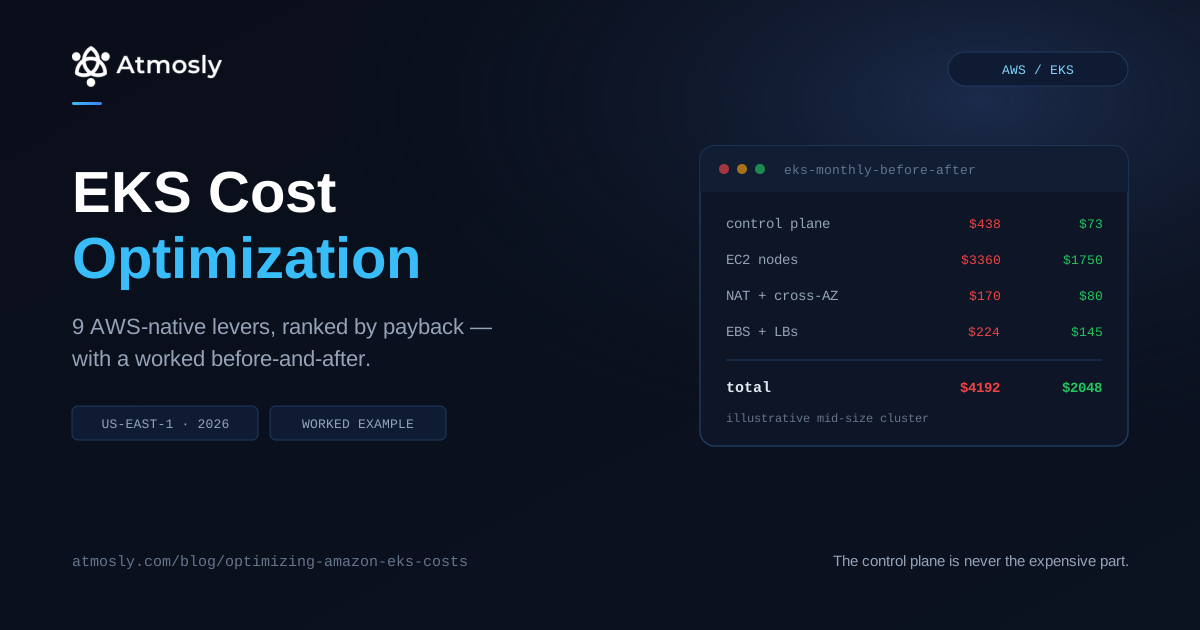
An illustrative mid-size production cluster in us-east-1 — three AZs, on-demand managed node groups, Cluster Autoscaler, a version that lapsed into extended support four months ago. Figures are modelled from published rates, not measured from a specific customer.
| Line item | Before | Action | After |
|---|---|---|---|
| Control plane | $438 | Upgrade off extended support | $73 |
| EC2 nodes | $3,360 | Karpenter + consolidation + 60% spot | ~$1,750 |
| NAT processing | $90 | Gateway + ECR endpoints | ~$35 |
| Cross-AZ transfer | $80 | Topology-aware routing | ~$45 |
| EBS | $164 | gp3 + reclaim orphans | ~$120 |
| Load balancers | $60 | Consolidate behind Ingress | ~$25 |
| Total | $4,192 → ~$2,048 | ||
The control plane line is the one worth staring at. It contributes $365 of the saving for an afternoon of upgrade work, and it wasn't a cost anyone chose to incur.
What This Guide Deliberately Doesn't Cover
Kept separate on purpose, so each question has one home:
- What EKS charges for, line by line — Amazon EKS pricing explained, with worked totals at three cluster sizes.
- Cloud-agnostic cost strategies — how to cut Kubernetes costs, which applies on any provider.
- Which tool to buy — Kubernetes cost optimization tools compared.
- Right-sizing methodology — right-sizing workloads with real data.
- Attributing spend to teams — Kubernetes cost allocation.
Key Takeaways
- Check extended support today. It's $365/month per cluster, applied automatically, and most teams don't know which of their clusters are on it.
- Karpenter over Cluster Autoscaler is usually the biggest single win — consolidation is the reason, not instance selection.
- Auto Mode's surcharge isn't covered by Savings Plans. Model it against committed rates.
- Fargate wins on intermittent workloads, EC2 on sustained ones. Many clusters should run both.
- Gateway VPC endpoints are free. Do this before anything else on the list.
- Commit last. Optimise, let the baseline settle, then buy commitments against the floor.
- Commitments never cover transfer, NAT or EBS — those levers keep their value regardless.
See Which Levers Apply to Your Cluster
Every item above is worth a different amount depending on where your waste actually sits.
- Connect a cluster read-only for a free scan — per-nodegroup bin-packing, spot-eligible groups with the live price delta, idle capacity separated out, and right-sizing recommendations with a saving on each. Nothing changes in your cluster.
- Or start on the free tier — one cluster, one environment, no credit card.